Continuing from the diagram included in the previous post, it’s time to implement the launcher.
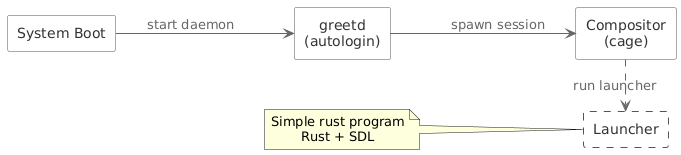
The plan is fairly straightforward. We need support for a couple of simple things:
- starting programs
- settings (sound volume, default output device)
- pairing controllers, mice and keyboards on bt
One important requirement is handling multiple input methods - both keyboards and gamepads.
I decided to write this in Rust with SDL support for gamepads and rendering on the screen.
Implementing the actual logic will likely take some time - especially since I’ve been spending less time on this project recently. For now, let’s start with building the application using Nix.
Nix package configuration
Let’s start by creating a new Rust project.
cargo new hello_world --bin
Next, we want to pin the rust toolchain version (rust-toolchain.toml).
[toolchain]
channel = "1.94.1"
components = ["cargo", "clippy", "rustfmt"]
This ensures builds are reproducible and independent of whatever Rust version happens to be installed on the system.
In Nix, this toolchain can be used to construct a custom rustPlatform:
  rustVersion = (pkgs.rust-bin.fromRustupToolchainFile ./rust-toolchain.toml);
  rustPlatform = pkgs.makeRustPlatform {
    cargo = rustVersion;
    rustc = rustVersion;
  };
Next, we use buildRustPackage to build our application.
It’s important to note that every time dependencies change, cargoHash must be updated.
For the first run, you can use lib.fakeHash and then replace it using correct value show in failed build log.
rustPlatform.buildRustPackage {
  pname = "retro-launcher";
  version = "0.1.0";
  src = ./.;
  cargoHash = "sha256-O3Shw1O6djZVGoC1qOhDnePcvPc3lEofNkUYmdBIY80=";

  nativeBuildInputs = with pkgs; [ pkg-config ];
  buildInputs = with pkgs; [ sdl3 sdl3-ttf sdl3-image ];

  meta = with lib; {
    description = "Retro launcher";
    license = licenses.mit;
    maintainers = [ ];
    platforms = platforms.linux;

    mainProgram = "retro-launcher";
  };
}
Summary
At this point, we have a working package configuration. The next step will be implementing the actual launcher, including rendering and input handling.