I’ve been tracking my personal finances for a while now. The challenge is that financial data is usually spread across multiple places.
Banks provide transaction history, brokers track investments, and currency exchange services keep records of exchange transactions. Each institution has its own reporting format and provides different tools to analyze the data.
As long as you only want to check the balance or current value of your assets, it’s not a big problem. The challenge begins when you want to answer more complex questions:
- How much do I actually spend on food or subscriptions each month?
- What is my current net worth?
- How does my portfolio compare against a broad market index?
Answering these questions requires bringing data from multiple sources.
I was looking for a tool that would allow me to keep all that data in a centralized place while offering an interface to flexibly query and analyze it.
At some point I came across Beancount1. It stores financial data in plain text files and provides powerful tools for querying and analyzing it.
What is Beancount?
Before going any further, it is worth explaining what Beancount is.
Beancount is a plain-text accounting system based on double-entry accounting. Every transaction affects at least two accounts, and the sum of all postings must always balance.
Instead of writing:
Assets:Checking -100 USD
we record the complete transaction:
    Expenses:Food 100 USD
    Assets:Checking -100 USD
Every transaction must balance to zero.
In simple terms, money always comes from somewhere and goes somewhere else. It never magically appears or disappears.
Accounts
Beancount defines five primary account types:
- Assets – cash, bank accounts, brokerage accounts, and other things you own.
- Liabilities - debts such as loans, mortgages, and credit card balances.
- Equity - special balancing accounts. In practice, this is often used as a bookkeeping hack to represent the money you already had before you started keeping records.
- Expenses - spending categories such as rent, groceries, or utilities.
- Income - salary, dividends and other sources of income.
Accounts can be organized hierarchically:
Assets:Bank:Savings

Income:Salary
Income:Bonus

Expenses:Food
Expenses:Bills
Expenses:Bills:Electricity
Expenses:Bills:Water
This makes categorization straightforward while keeping the account structure flexible.
Transactions
A typical transaction looks like this:
2025-06-16 * "3D Printer Shop" "Buying  a 3D printer"
  Assets:Bank:Savings                          -1000.00 USD
  Expenses:Hobby                                1000.00 USD
The first line contains the date, payee, and an optional narration. The following lines are postings consisting of an account and a quantity in specified currency.
Beancount can also record exchanges of different currencies or commodities. This allows Beancount to track the acquisition cost of assets:
2025-06-16 * "Currency Exchange"
  Assets:Bank:PLN                            -1000.00 PLN
  Assets:Bank:EUR                              232.24 EUR @@ 1000.00 PLN
Here we are exchanging 1000 PLN for 232.24 EUR. From this information, Beancount can automatically calculate the cost basis of the acquired euros.
Fava - web UI for Beancount
Now that we have our transactions stored in plain text files, we need a better way to explore them. Beancount provides powerful querying capabilities, but raw query results are often less readable than charts and visualizations.
That’s where Fava 2 comes in.
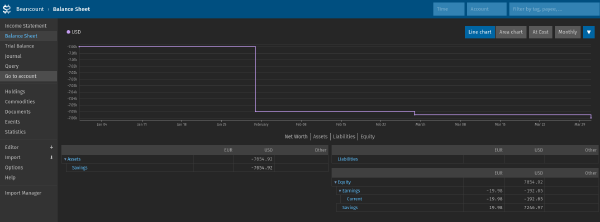
Fava is a web interface for Beancount. Besides editing .beancount files, it provides visualizations of account balances and other financial data.
Additional plugins can generate more advanced charts and perform portfolio analysis, including return calculations (MWRR, TWRR, IRR) and comparisons against selected market indices.
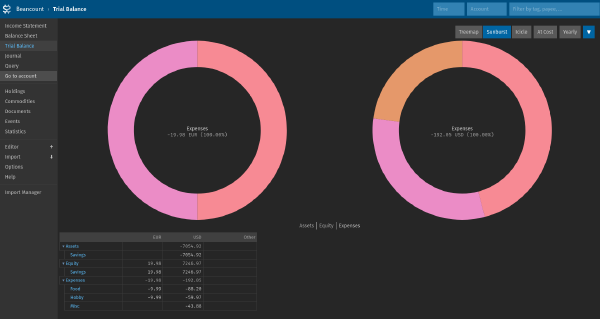
Personally, I use two popular plugins:
- fava-dashboards - custom dashboards and charts
- fava-portfolio-returns - portfolio analysis, return calculations, dividend tracking, and benchmark comparisons
What’s Next?
Beancount and Fava solve the problem of storing and analyzing financial data. However, there is still a practical challenge - importing transactions into the system.
Over time, I ended up developing multiple importers for different banks and brokers. Fava already provides a web interface for running importers and reviewing imported transactions.
While the importers worked well individually, managing the overall import process became increasingly inconvenient as my setup grew.
This eventually led me to develop a small Fava extension that makes it easier to import transactions and organize them into multiple .beancount files.
I’ll take a closer look at it in a future post.